Mouse scrolling is something most people use every day, whether browsing websites, reading documents, reviewing spreadsheets, or working with long lists of content.
Yet many Windows users notice that scrolling can sometimes feel abrupt, inconsistent, or less fluid than expected. While modern displays and hardware have improved significantly, the traditional mouse wheel still operates differently from the smooth scrolling experience commonly found on touchpads and mobile devices.
Fortunately, there are several ways to improve scrolling and make everyday computer use feel more comfortable.
Why Mouse Scrolling Sometimes Feels Rough
Traditional mouse wheels typically scroll in fixed steps. Each wheel movement sends a scroll command that moves content by a predefined number of lines.
Depending on the application, this can create a scrolling experience that feels:
- Abrupt or jumpy
- Too fast or too slow
- Inconsistent between applications
- Less natural than touchpad scrolling
The effect often becomes more noticeable on high-resolution displays where larger amounts of content are visible at once.
Different applications may also process mouse wheel input differently, leading to variations in scrolling behavior from one program to another.
Check Windows Mouse Settings First
Before making any changes, it is worth reviewing your Windows mouse settings.
Open:
Settings → Bluetooth & Devices → Mouse
Pay particular attention to:
Lines to Scroll at a Time
Windows allows you to control how many lines are scrolled for each wheel movement.
A lower value provides more precise control, while a higher value may feel faster but less controlled.
Pointer Speed
Although pointer speed does not directly affect scrolling, overall mouse responsiveness can influence how comfortable the experience feels.
Scroll Inactive Windows
Enabling this option allows scrolling in windows without first clicking them, which can improve workflow efficiency.
These settings are simple but can make a noticeable difference.
Modern Mice Can Improve the Experience
Not all mouse wheels behave the same way.
Some modern mice offer:
- Higher resolution wheel sensors
- Precision scrolling wheels
- Free-spin scrolling modes
- Better wheel mechanisms
While hardware alone cannot fully replicate touchpad-style scrolling, a quality mouse can provide a more comfortable and consistent experience.
Use Smooth Scrolling Software
For users who want a more refined scrolling experience, smooth scrolling software can help bridge the gap between traditional wheel scrolling and modern touchpad behavior.
Smooth scrolling software works by converting abrupt wheel steps into fluid motion that feels more natural while reading, browsing, and working.
Potential benefits include:
- Smoother transitions between content
- More comfortable long-form reading
- Better control when navigating large documents
- Consistent scrolling across applications
- Customizable scrolling behavior
Many users find that smooth scrolling reduces visual fatigue and makes everyday computer use feel more polished.
A Simple Solution: ButterScroll
For Windows users looking for customizable smooth scrolling, ButterScroll provides a lightweight solution designed specifically for mouse users.
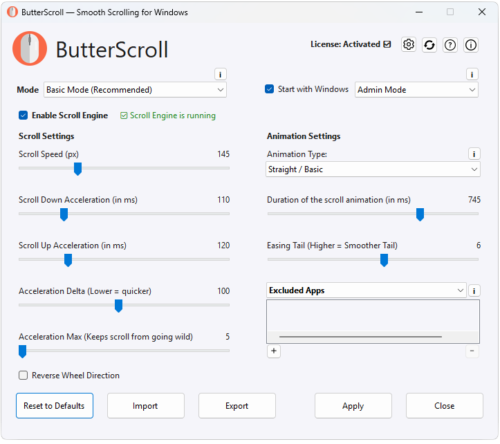
ButterScroll allows scrolling behavior to be adjusted using settings such as:
- Scroll speed
- Scroll duration
- Acceleration
- Easing and smoothing controls
- Application-specific settings
Rather than forcing a single scrolling style, ButterScroll allows users to fine-tune the experience to match personal preference.
Whether reading long web pages, working with spreadsheets, or navigating documents, customized smooth scrolling can make daily computer use feel significantly more comfortable.
Final Thoughts
While Windows provides basic scrolling controls, there are several ways to improve the overall experience.
Adjusting Windows settings, using quality hardware, and adding smooth scrolling software can all contribute to a more natural and comfortable workflow.
For users who spend hours each day browsing, reading, or working with documents, even small improvements in scrolling can make a noticeable difference over time.